
PDF is the most widely used file format for professional magazine printing because it preserves the layout, fonts, and images of your design.
As long as your PDF file meets printing specifications, you can easily produce high-quality printed PDF magazines.
This guide explains how to print a magazine from a PDF file and outlines key requirements to help you achieve the best printing results.
Key Requirements for Printing a Magazine from a PDF
Before printing the magazine, it is recommended to check that your PDF file meets print specifications. This ensures the final product is sharp and visually appealing.
1. Choose the Right Magazine Size.
Select a standard magazine size that matches your project. Common sizes include:
- A4: 210 × 297 mm (8.27” × 11.69”)
- A5: 148 × 210 mm (5.83” × 8.27”)
- US Letter: 8.5” × 11”
- Custom Size: Available for unique magazine formats.
2. Use High-Resolution Images.
To ensure clear print quality, it is recommended that the image resolution be at least 300 DPI.
Low resolution can easily result in blurry images, compromising the overall quality of the magazine.
3. Add Bleed and Safe Margins.
- Bleed: 3 mm (0.125”) on all sides to prevent white edges after trimming.
- Safe Margin: Keep important text and graphics at least 3-5 mm inside the trim line.
4. Use the Correct Color Mode.
Most printing equipment uses the CMYK color mode. You can convert your file to CMYK to ensure more accurate printed colors.
Once you have confirmed that the files meet the requirements, you can proceed to print the magazine by following the steps below.
How to Print Magazine from PDF
Printing a PDF as a magazine is actually quite simple, and here are three most frequently used approaches.
Method 1: Print a Magazine from PDF via MiniTool PDF Editor
If you want to print a magazine from a PDF, MiniTool PDF Editor offers an easy way to do it with its built-in Booklet printing feature.
It allows you to adjust print settings such as paper size, orientation, and page layout, helping ensure your magazine is printed in the correct format. Follow the steps below.
MiniTool PDF EditorClick to Download100%Clean & Safe
Here’s how to print magazine from PDF using MiniTool PDF Editor:
Step 1: Right-click your magazine in PDF format and click Open with, then select MiniTool PDF Editor.
Step 2: Click the Print icon or press Ctrl + P to open the print PDF dialog box.
Step 3: Go to Page Sizing & Handling and click Booklet. Next, choose a booklet subset like Both sides, and optionally select right-edge binding.
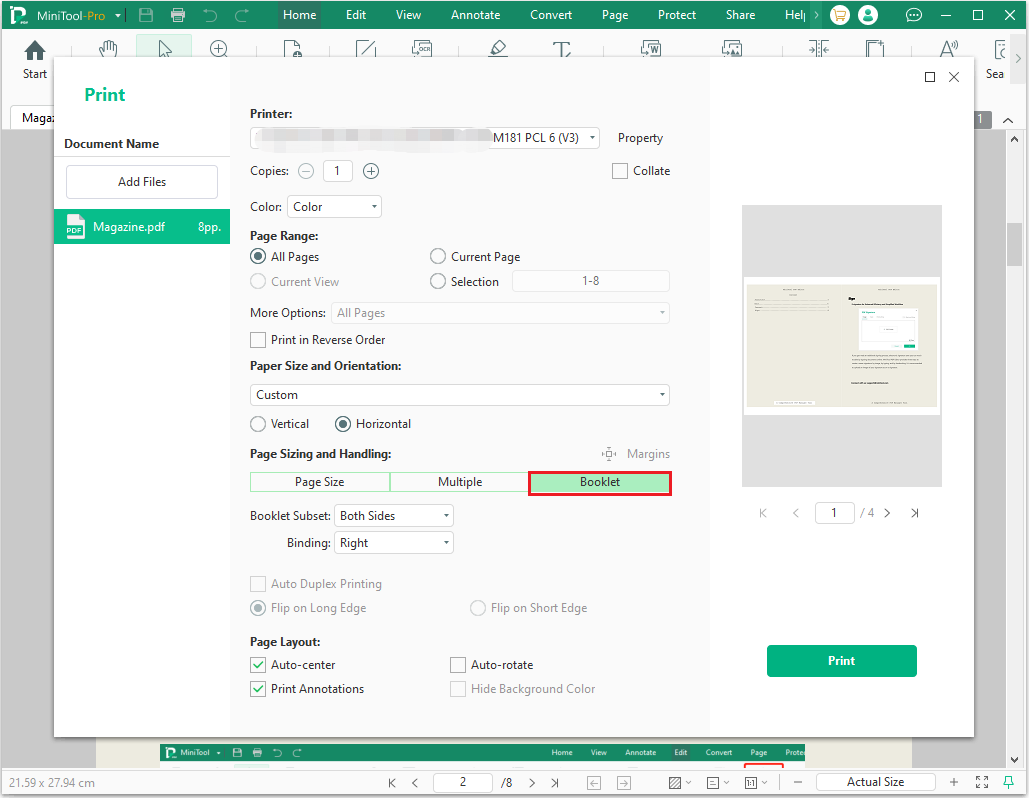
Step 4: Click the Print button.
If you prefer not to install any software, you can also print magazine from PDF online. Refer to the method below.
Method 2: Print a Magazine from a PDF via Online Tools
If you want to print a PDF file as a magazine but prefer to avoid the complexities of the printing process, online printing services offer a convenient solution.
These platforms handle the entire workflow for you, from file upload to printing and delivery.
Generally, the process is simple: upload your PDF, select the magazine size, paper type, and binding style, preview the result, and place your order.
Here are some reliable online magazine printing platforms:
- Mixam: A popular platform for custom, on-demand magazine printing. It provides real-time pricing, a wide range of paper and binding options, and international shipping, making it suitable for both personal and professional projects.
- Blurb: Blurb specializes in high-quality magazine and book printing, delivering professional results comparable to professionally published magazines. It also integrates with Adobe InDesign.
- Lulu Direct: Lulu Direct is well-suited for individual creators and small-batch printing. It uses a print-on-demand model, meaning it prints when an order is placed, making it ideal for self-publishing or niche magazines.
Method 3: Print a Magazine from a PDF at a Print Shop
If you do not have a printer and prefer not to use online printing services, you can choose a local print shop to print magazine layout from PDF.
Simply take the PDF file to the shop, select the paper type, size, and binding method, and the staff will handle the rest of the printing process.
This method is straightforward and convenient, making it suitable for small print runs or projects requiring a quick turnaround.
Print Magazine from PDF FAQ
1. Low-resolution images
2. Missing bleed
3. RGB color mode instead of CMYK
4. Fonts not embedded
Bottom Line
Printing a magazine from a PDF is not complicated. The key is to prepare a print-ready PDF and choose the printing method that best suits your needs. If you want to print it yourself, you can use a PDF tool that supports booklet printing. For more professional results, online printing services or local print shops are often the better choice.
If you have any questions or suggestions while using the MiniTool PDF Editor, you can contact us via support@minitool.com to get a quick reply.