
A photo album serves as a medium for collecting, managing, displaying, and preserving photographs.
Individual photos within an album are typically in JPG or HEIC format, whereas the file used to store the entire album collection is usually in PDF format. This file format facilitates easy page-turning, layout arrangement, and printing.
How to print a photo book from PDF? You can refer to the following 2 methods.
How to Print Photo Book from PDF at Home
If you have a photo printer, you can print photo albums yourself at home. Photo printers typically come equipped with dedicated printing software. You can use this software to perform personalization tasks such as layout arrangement, filter adjustments, and adding text.
Alternatively, you can use specialized design software—such as Canva—to create your photo album and save it as a PDF file. Then, use MiniTool PDF Editor to print the album.
MiniTool PDF EditorClick to Download100%Clean & Safe
Here is the guide:
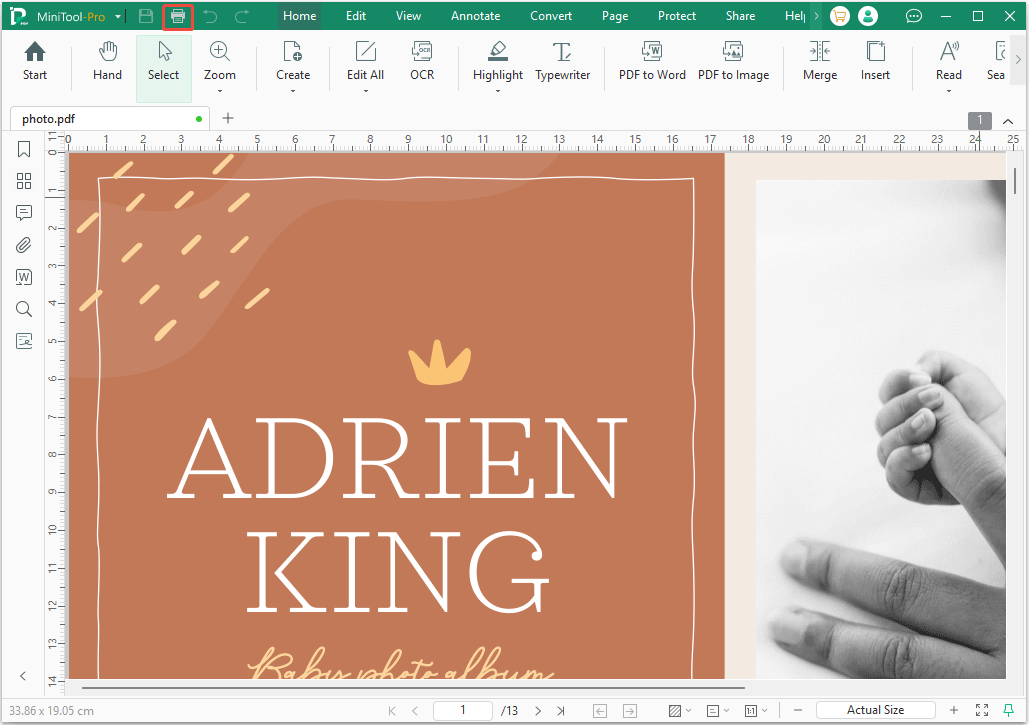
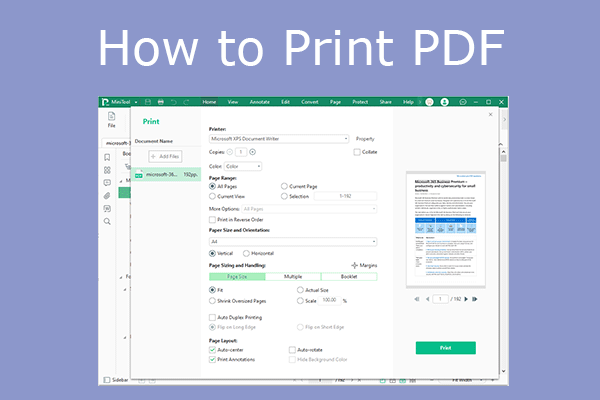
Step 1: Open the photo book PDF file with MiniTool PDF Editor and then click the Printer icon in the top left corner.
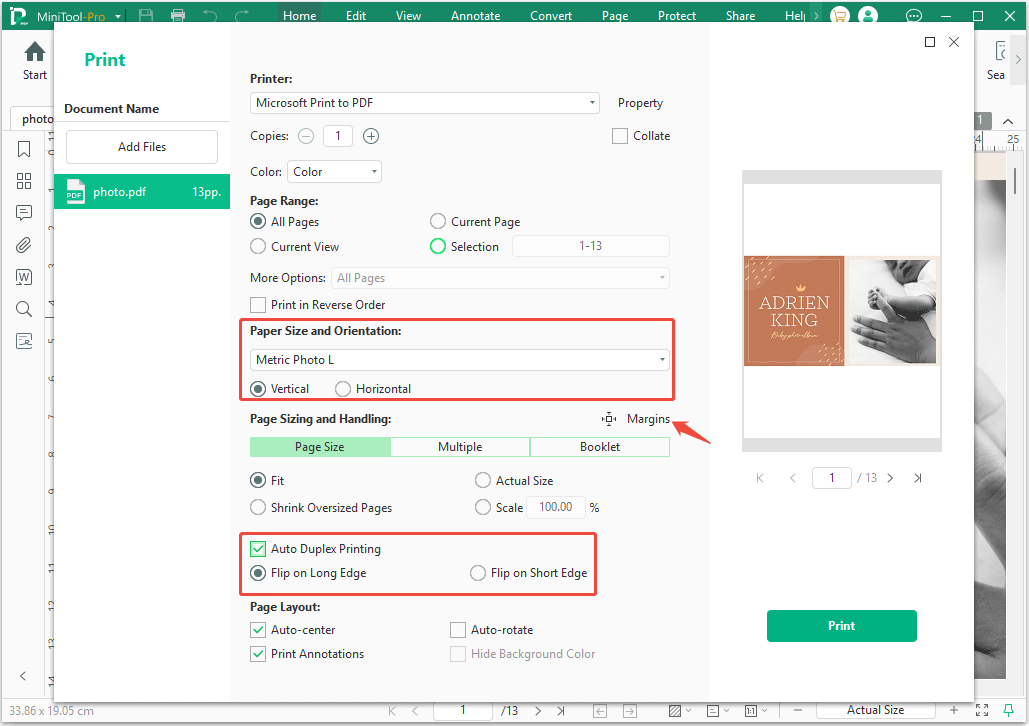
Step 2: Select the photo printer, adjust the following print settings, and then click Print.
- Paper Size and Orientation: Choose a paper size suitable for a photo book, such as A3, A4, English Photo L (3.5x5in), Metric Photo L (3.5x5in), Photo 10x12, Photo 4x4, Photo 5x5, 16x20in, Photo 89x89mm, etc.
- Margins: You need to leave a small margin (typically 0.125 to 0.25 inches) around the edges of your pages to ensure important elements aren't cut off when the book's pages are trimmed. In addition, a certain amount of binding space (usually 10mm - 15mm) should be left on the left side or top of the album to prevent important details of the photos from being buried inside the binding line.
- Auto Duplex Printing: Professional photo albums are typically printed on a single side, after which the backs of two sheets are bonded together (a process known as "back-to-back mounting"). However, if you are creating a simple booklet at home yourself, you can simply print on both sides.
How to Print Photo Book from PDF Online
To print a photo book from a PDF, a common method is to upload your print-ready PDF to a specialized custom book printing service.
These platforms allow you to directly submit your file and choose your preferred binding (e.g., hardcover, softcover, or lay-flat). Besides, they also offer tools to help you edit the photo book before printing.
Here are some top platforms to use for PDF photo book printing.
- Blurb PDF to Book: Ideal for custom sizing, professional layouts, and standard consumer photo books. They provide precise templates and a plug-in to ensure your spreads line up.
- Mixam Photo Books: Best for high-quality, customizable printing (including beautiful paper finishes and cover options). They require a single 300 DPI PDF with your cover and pages combined.
- PrestoPhoto PDF Printing: Offers great flexibility for multi-page photo books and easily converts desktop exports (PDFs) into finished albums.
- PrintingCenterUSA: Perfect for larger volume photo books or portfolios, offering hard, soft, saddle-stitched, and perfect binding options.
Types of Photo Paper
When making a photo album, the photo paper is an important factor that determines the overall texture of the album. Here are some common types of photographic paper and their applicable scenarios.
| Type | Material | Applicable Scenarios |
| Glossy Photo Paper | With a high gloss level, it can make photos appear more vibrant and clear. | Suitable for developing portraits and landscape photos. |
| Matte Photo Paper | It reflects less light, appears softer, and is less likely to leave fingerprints. | Suitable for presenting artistic photos and some professional display photos. |
| Fiber-Based Paper (FB) | It is traditional black and white photographic paper, with paper as the base and coated with a photosensitive emulsion layer. | Suitable for preserving important black and white images. |
| Resin-Coated Paper (RC) | It has a plastic layer coated on top of the FB paper, making the photographic paper less susceptible to moisture penetration and increasing its durability. | Suitable for black and white photos and photos with special effects. |
Common Photo Paper Sizes
Photos can be printed in various sizes, from one-inch ID photos to 5 x 7-inch framed photos, to large posters and advertisements of 16 x 20 inches, or even larger displays.
Depending on the type of album and photos, here are some commonly used album and photo size options.
Personal Album and Everyday Photos
| Size (inch) | Size (cm) | Applicable Scenarios |
| 3.5 x 5 (3R) | 8.9x12.7 | Suitable for wallet photos or small display stands. |
| 4 x 6 (4R) | 10.2x15.2 | It is the most common standard photo paper size, suitable for all kinds of photo albums. |
| 5 x 7 (5R) | 12.7x17.8 | Suitable for half-body portraits. |
Photo Portfolio and Hardcover Album
| Size (inch) | Size (cm) | Applicable Scenarios |
| 6x8 (6R) | 15.2x20.3 | Ideal for landscape and group photos. |
| 8x10 (8R) | 20.3x25.4 | Suitable for studio portraits, family photos, etc. |
| 10x12 (12R) | 25.4x30.5 | It is a common size for large wedding albums or square photography portfolios. |
Magazine-Quality Catalogs and Large-Format Printing
| Size (cm) | Applicable Scenarios |
| A4 (21.0x29.7) | It is the size most favored by modern magazine photo albums and children's growth albums. |
| A3 (29.7x42) | Suitable for visually stunning landscapes or large picture albums. |
Bottom Line
You can print a photo book from a PDF with MiniTool PDF Editor and online services. This post offers printing tips, photo paper selection tips, and photo paper size recommendations. If you encounter issues when using MiniTool PDF Editor, send an email to support@minitool.com for assistance.
About The Author
Position: Columnist
Linda has been an editor at MiniTool for seven years. She continuously learns about computers and puts her knowledge into practice. Moreover, she is particularly knowledgeable in disk management, data recovery, system installation, and PDF editing. Her articles typically reference multiple examples or are based on her own experience, providing users with the most suitable solutions.