

A signature is a handwritten name, nickname, or personal mark used to verify identity, express intent, acknowledge content, or assume responsibility. There are many types of signatures, but when signing electronic documents, electronic signatures and data signatures are primarily used.
What Is an Electronic Signature?
An electronic signature has a broad meaning, referring to any way of expressing consent or approval for documents electronically. It replaces handwritten signatures, offering a fast, convenient, and economical way to sign documents compared to printing, signing, scanning, or mailing paper copies.
An electronic signature takes many forms, including entering a name, clicking an “I agree” checkbox, drawing a signature on a touchscreen device, scanning an image or fingerprint, and more. It is widely used in a variety of informal documents, such as:
- Signing contracts and agreements online (service contracts, job offers, confidentiality agreements, sales agreements, online shopping, invoices, etc.).
- Accepting terms and conditions during software installation or account registration.
- Approving internal company documents, such as purchase orders or human resources forms.
What Is a Digital Signature
A digital signature is a more secure electronic signature based on Public Key Infrastructure (PKI) technology.
How does digital signature work? The process is as follows:
- When a user signs a document, the software calculates a unique hash value (a digital fingerprint of the content) and encrypts this hash value using the sender’s private key to generate a digital signature.
- The recipient’s software uses the sender’s public key to decrypt the signature, thus restoring the original hash value, and compares it with the original hash value. If the hashes match, the signature is valid.
A digital signature offers the following security mechanisms.
- Ensure that the document has not been tampered with, because any changes made to the document after it has been signed digitally will invalidate the signature.
- Confirm the signer’s identity. The signature and private key embedded in the digital certificate can be used to verify the signer's identity and prevent impersonation.
- Make it impossible for the signer to deny signing the document, because creating a digital signature requires their private key.
Based on these security mechanisms, digital signatures are frequently used in highly regulated industries or processes involving sensitive and private data, such as:
- Secure financial transactions.
- Banking, loan, or insurance paperwork.
- Government contracts or other sensitive government documents.
- Legal contracts and agreements.
- Medical prescriptions and records.
- Submitting government forms or tax documents electronically.
- Completing real estate transactions through digital platforms.
Digital Signature vs Electronic Signature
| Electronic Signature | Digital Signature | |
| Convenience | It is very convenient and comes in various formats. | The first signature is a little more complicated because a digital ID/certificate needs to be generated first. |
| Security | Unable to verify the integrity and authenticity of the document. | It can verify whether a document has been tampered with. |
| Legal Effect | Most electronic signatures cannot guarantee that they were actually signed by the person in question, nor can they guarantee that the document has not been modified after the signature. Thus, their legal effect is weak. | Digital signatures are uniquely linked to the signer, can identify the signer, and can verify whether a document has been tampered with, thus having high legal validity. |
| Authentication Methods | Email, IP address tracking, two-factor authentication, etc. | Use a digital certificate issued by a trusted third-party Certificate Authority (CA). |
| Application Scenarios | Routine business transactions and agreements. | High-value, sensitive, or legally critical documents. |
How to Add an Electronic or Digital Signature in PDF
Formal documents are mostly in PDF format. To add an electronic or digital signature to a PDF file, you can use MiniTool PDF Editor.
MiniTool PDF EditorClick to Download100%Clean & Safe
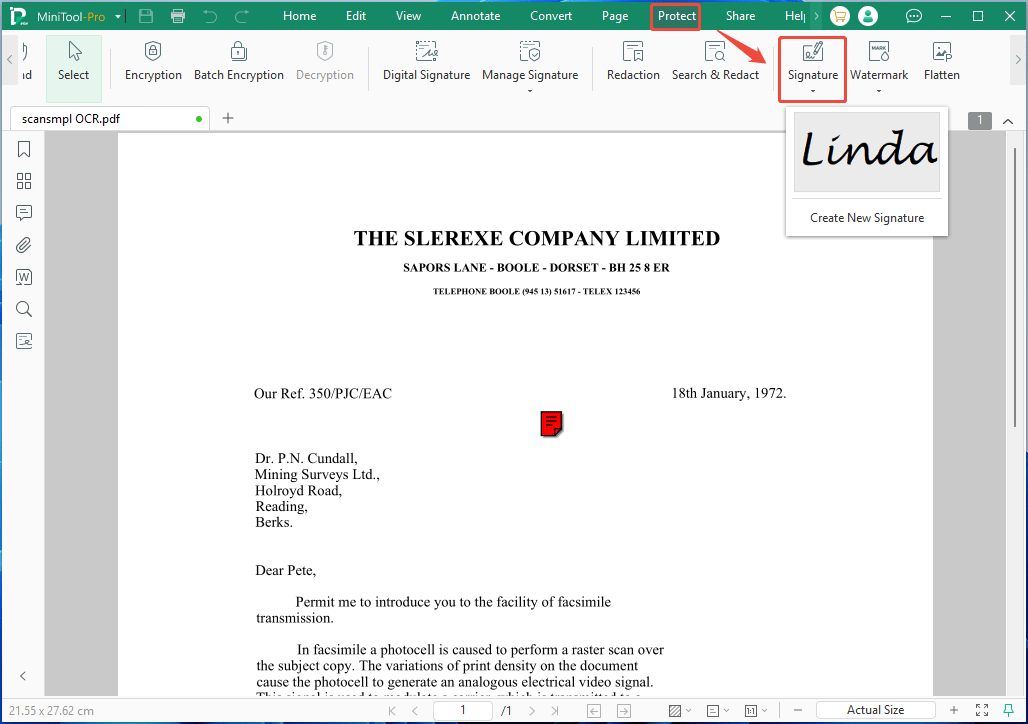
To add an electronic signature, click Protect > Signature. You can create a new signature or use an existing signature. The electronic signature can be created by drawing, typing, using an image, or taking a photo with the camera.
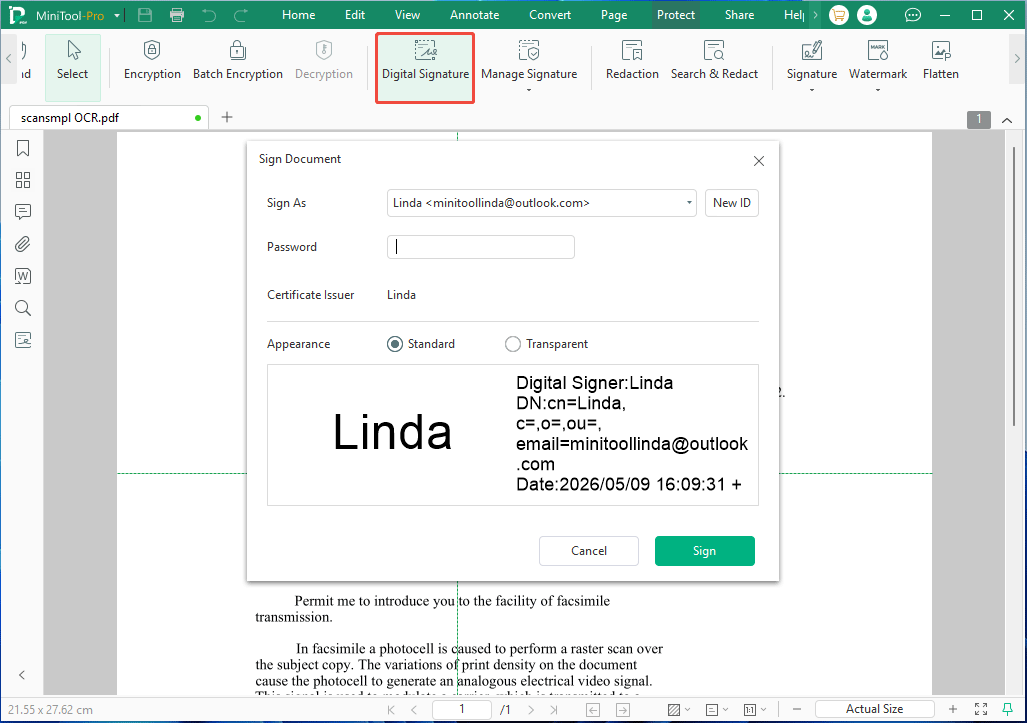
To add a digital signature, click Protect > Digital Signature. Then, you can create a new digital ID or import an existing digital ID from a file (typically a PFX file). If the digital ID is created or imported, just enter the password to sign it.
MiniTool PDF Editor is a multifunctional PDF program, meeting most PDF file processing needs. You can use it to edit, annotate, convert, compress, and protect PDFs.

Know More About Digital Signature: AES and QES
According to EU regulations, digital signatures are mainly divided into two types: Advanced Electronic Signatures (AES) and Qualified Electronic Signatures (QES). Both are based on PKI technology to encrypt files to ensure integrity, but QES has the highest security level and legal evidentiary value.
- AES: Meet technical requirements, such as having a uniquely associated signatory, verifiable identity, and tamper-proof nature. Identity verification can be through electronic ID cards, passport photos, ID cards, or driver's licenses.
- QES: QES employs extremely stringent authentication methods, making it legally equivalent to a handwritten signature. The authentication must be conducted through a certified Qualified Trusted Service Provider (QTSP) and typically involves on-site verification of physical documents or high-security remote verification (such as video authentication, video + eID, or bank authentication). Furthermore, after obtaining a digital certificate, the applicant must sign it using a QSCD (Qualified Signature Creation Device, such as a smart card).
Bottom Line
Although digital signatures are a type of electronic signature, they differ significantly from ordinary electronic signatures in terms of security and legal validity.
This post explains their differences in detail and shows you how to add them in PDF using MiniTool PDF Editor. If you encounter issues when using this software, send an email to support@minitool.com for assistance.
About The Author

Position: Columnist
Linda has been an editor at MiniTool for seven years. She continuously learns about computers and puts her knowledge into practice. Moreover, she is particularly knowledgeable in disk management, data recovery, system installation, and PDF editing. Her articles typically reference multiple examples or are based on her own experience, providing users with the most suitable solutions.